
Appearance
Get Started with Kurloo APIs
Data from the Kurloo Nest can also be accessed via our public API. This guide will walk you through authentication, making your first API call, and common use cases.
Prerequisites
Before you begin, ensure you have:
- An active Kurloo account with access to at least one account
- A tool for making HTTP requests (e.g., cURL, Postman, or a programming language with HTTP support)
API Keys
An API key must be used for authentication. API keys are generated on a per-user basis and are managed in your user profile by selecting "Manage API keys".
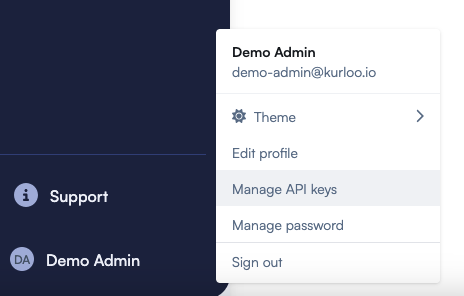
Creating an API Key
- Navigate to your user profile
- Click "Manage API keys"
- Click "New API key" to generate a new API key
- Optionally restrict the API key to one or more projects
- Click "Generate API key" to create the key
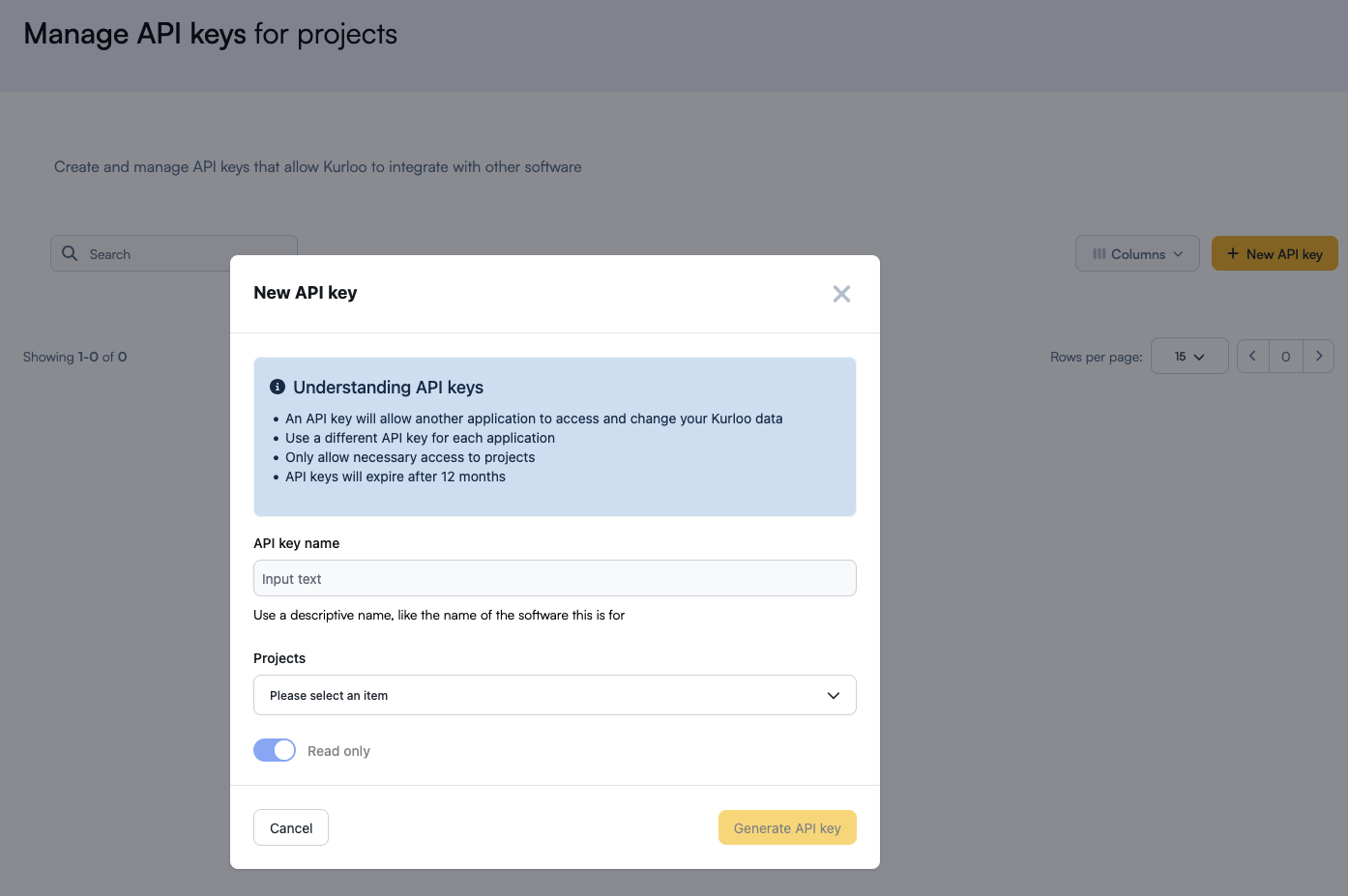
API key generation limits
Each account only allows to generate maximum 5 API keys across users. For example, if User A has 3 API keys and User B has 2 API keys, no additional keys can be created until an existing key is deleted.
Save your API Key
After generating your API key, click the "Copy to clipboard" button to copy the key to your clipboard, and then save it in a secure location such as a password manager or encrypted file.
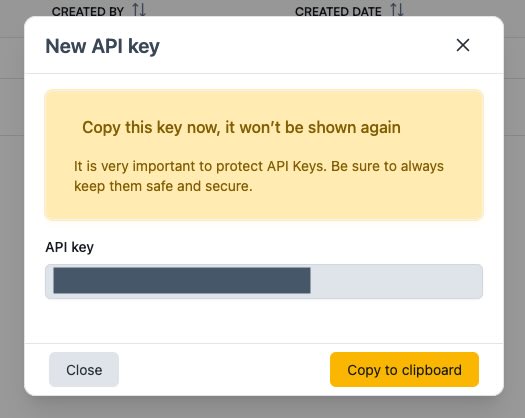
Don't forget to save your key!
Ensure you record the API key at this stage as it isn't viewable after this point.
API Key Lifecycle
- Disabling/Reactivating: Keys can be temporarily disabled or re-activating using the "Actions" menu.
- Expiration: API keys automatically expire after one year. You will need to generate a new key before expiration to maintain access.
- Deletion: Keys can be permanently deleted using the "Actions" menu.
Making Your First API Call
Authentication
Include your API key in the request header:
bash
curl -H "X-Api-Key: YOUR_API_KEY" \
  https://app.kurloo.io/v1/api/projects
Base URL
All API requests should be made to:
https://app.kurloo.io/v1/apiSupported HTTP Methods
Currently, only GET requests are supported. Additional HTTP methods (POST, PUT, DELETE, etc.) are under development and will be available in future releases.
Rate Limits
Be aware of API rate limits to avoid throttling. Check the X-RateLimit-Remaining header in responses to monitor your usage.
API Usage
Free Tier Rate Limits
Each API key is limited to 1,000 requests per month on the free tier. If you require additional usage, please contact our customer success team.
Technical documentation for the API can be found at API reference.
There is also a quickstart Jupyter notebook showing how to perform some common operations using the API located at: API Quickstart.
Troubleshooting
| Error Code | Description | Solution |
|---|---|---|
| 400 | Bad request | Check that the request syntax and input parameters are valid |
| 401 | Unauthorized | Verify your API key is valid, active, and not expired |
| 403 | Forbidden | Ensure your API key has permission to access the requested resource |
| 404 | Not found | Verify the resource exists and URL path parameters are correct |
| 409 | Conflict | The request conflicts with the current state of the resource |
| 422 | Validation error | Ensure your API key has sufficient permission to access the resource |
| 429 | Too many requests | Reduce request frequency or wait before retrying |