
Appearance
Tilt compensation V2.6.0
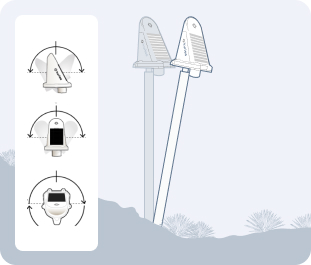
Tilt compensation is an advanced feature that improves the accuracy of displacement measurements by accounting for the physical tilt of the sensor mounting pole. This ensures that you're measuring actual ground movement, not the combined effect of ground movement and pole lean.
Overview
Traditional GNSS monitoring assumes the sensor is perfectly vertical. However, in real-world conditions:
- Mounting poles may not be perfectly plumb during installation
- Poles can gradually lean over time due to environmental factors
- Sensors mounted on structures may tilt with the structure itself
Without compensation, these tilts introduce errors into displacement measurements. Tilt compensation uses the internal accelerometer and magnetometer sensors in Revision C Kurloo devices to measure and correct for these tilts.
How Tilt Compensation Works
The tilt compensation algorithm performs complex mathematical transformations:
Measurement Inputs
- GNSS Displacement: Raw E (East), N (North), U (Height) measurements from the GNSS receiver
- Tilt Readings: Tilt A and Tilt B angles from the accelerometer
- Heading: Compass direction from the magnetometer
- Pole Height: The height of the sensor above the ground (configured in sensor settings)
Calculation Process:
Horizontal Displacement Calculation:
- X displacement = Pole height × sin(Tilt B)
- Y displacement = Pole height × sin(Tilt A)
Rotation Compensation:
- The horizontal displacements are rotated based on the sensor's heading
- This accounts for the sensor's orientation relative to true north
Corrected Coordinates:
- Corrected E = Raw E - Rotated X displacement
- Corrected N = Raw N - Rotated Y displacement
- Corrected U = Raw U - Vertical offset
Vertical Offset:
- Calculated using the Pythagorean theorem: √(pole height² - (X² + Y²))
- Ensures the vertical measurement reflects ground movement, not pole lean
Tilt Data Lookup
- The system uses a 7-day lookback window to find applicable tilt readings
- If no tilt reading exists at the exact time of a GNSS reading, the most recent tilt reading within 7 days is used
- This ensures continuous compensation even when tilt readings are less frequent than GNSS readings
Mathematical Foundation
The tilt compensation implementation uses validated surveying principles to transform measured coordinates into true ground displacement values. The algorithm ensures that pole lean doesn't artificially inflate apparent ground movement.
Compatible Devices
Device Compatibility
Tilt compensation is only available on Revision C (Rev C) Kurloo devices that include:
- Internal accelerometer for tilt measurement (Tilt A, Tilt B)
- Magnetometer for heading measurement
- Firmware supporting tilt data transmission
Identifying Rev C Devices:
- Check the 6th character in your serial number
- Or check the 4th character in your device ID
- If either shows 'C', the device supports tilt compensation
If you would like to enable this feature in your project, please contact Kurloo sales team.
Enabling Tilt Compensation
To enable tilt compensation for a sensor:
Prerequisites
- Sensor must have a Rev C Kurloo device attached
- Pole height must be configured in sensor settings (Distance to Surface → Height)
- Sensor application type should be set appropriately (Settlement, Slope, etc.)

Beta Feature
Tilt compensation is currently in beta release. This feature will be enhanced once the functionality is stable from both software and hardware perspectives. We recommend testing in non-critical scenarios first and reporting any unexpected behavior to Kurloo support.
Activation Steps
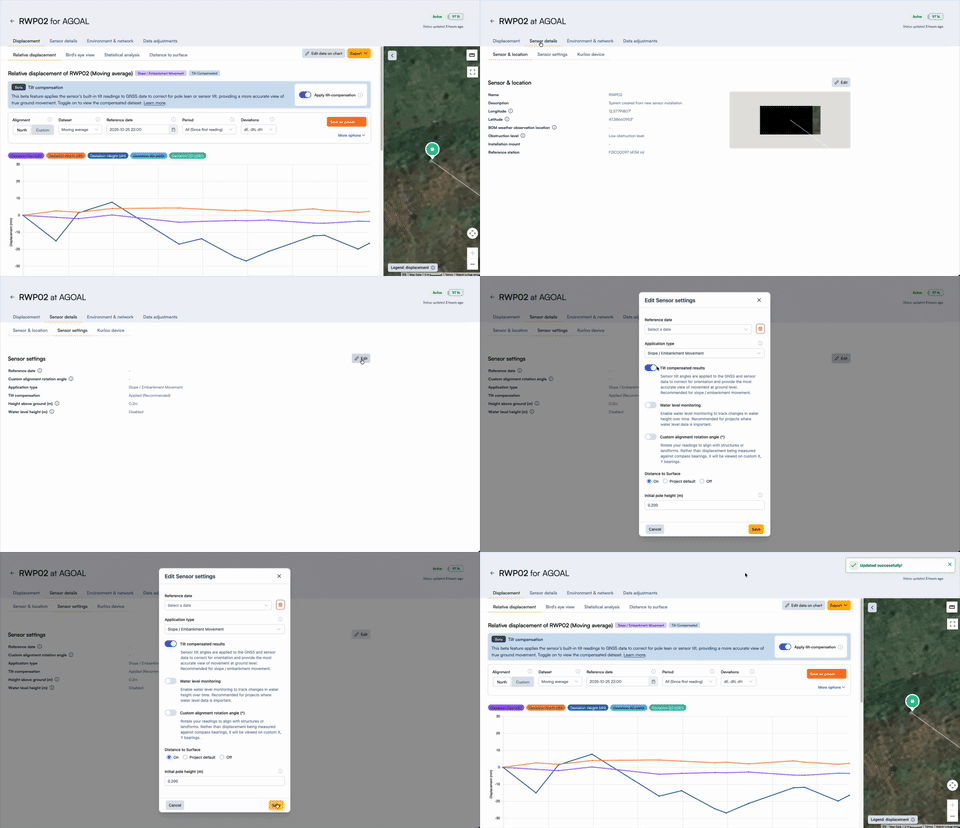
- Navigate to the sensor detail page
- Go to Location & device tab → Sensor settings
- Click Edit to open sensor configuration
- Locate the Tilt Compensation section
- Toggle Enable tilt compensation to ON
- Verify the Pole height value is correct (required for calculations)
- Click Save changes
Configuration Requirements
| Setting | Requirement | Purpose |
|---|---|---|
| Pole Height | Must be greater than 0 | Used in displacement calculations |
| Application Type | Recommended to set | Optimizes defaults for your use case |
| Device Type | Must be Rev C | Only Rev C devices provide tilt data |
Pole Height Accuracy
Accurate pole height is critical for tilt compensation. Measure from the ground mounting point to the antenna phase center. Even small errors in pole height can affect the accuracy of compensation.
Viewing Compensated Data
Once enabled, tilt compensation affects how displacement data is displayed:
Visual Indicators
When viewing a sensor with tilt compensation enabled, you'll see:
- Tilt Compensated Badge: Appears next to the sensor name or in displacement views
- Adjusted Values: All displacement charts show calibrated E, N, U values
Chart Display
Compensated displacement data appears in:
- Relative Displacement
- Bird's Eye View
- Statistical Analysis
Dataset Options
When viewing displacement data with tilt compensation, you can choose:
- Moving Average (tilt-compensated if enabled)
- Edited Raw Data (tilt-compensated if enabled)
- Raw Data (tilt-compensated GNSS readings)
Selecting "Raw Data" will still show the calibrated results.
Understanding the Impact
When Tilt Compensation Matters Most
Sloped Installations
- Sensors mounted on hillsides or embankments
- Poles that cannot be installed perfectly vertical
Long-Term Monitoring
- Gradual pole lean over months or years
- Seasonal ground movement affecting pole angle
High-Precision Requirements
- Projects requiring millimeter-level accuracy
- Critical infrastructure monitoring
Structural Monitoring
- Sensors attached to structures that may tilt
- Building or bridge deformation monitoring
Expected Improvements
With tilt compensation enabled:
- Reduced False Positives: Pole lean won't trigger movement alerts
- Improved Accuracy: Measurements reflect true ground displacement
- Better Trend Analysis: Long-term trends are more reliable
- Clearer Data: Separates sensor tilt from actual ground movement
Limitations and Considerations
Important Limitations:
Requires Rev C Devices
- Older device revisions cannot provide tilt data
- No compensation possible without internal sensors
Pole Height Dependency
- Calculations require accurate pole height
- Errors in pole height propagate through compensation
Tilt Range Constraints
- Extreme tilts (approaching horizontal) may exceed calculation limits
- System validates that horizontal displacement < pole height
Lookback Window
- Default 7-day lookback for tilt readings
- Very sparse tilt data may reduce effectiveness
Not Retroactive
- Historical data before enablement is not automatically reprocessed at this stage
- You will need to contact Kurloo customer success team to sync calibrated data for you.
Validation Required
After enabling tilt compensation, review your displacement charts to ensure:
- Values appear reasonable and consistent
- No sudden jumps or discontinuities at the enablement point
- Compensated data improves clarity of actual ground movement
If you observe unexpected results, verify pole height configuration and contact Kurloo support.
Tilt Data Overlay
In addition to compensation, you can visualize tilt measurements directly:
- In the Chart Controller, select Environment & Status overlay
- Choose Tilt or Heading from the overlay dropdown
- View Tilt A, Tilt B, and Heading values plotted alongside displacement
This helps you:
- Understand when and how much the sensor tilts
- Correlate tilt changes with apparent displacement changes
- Validate that compensation is working as expected


Use Cases for Tilt Overlay
- Installation Validation: Verify pole was installed reasonably vertical
- Maintenance Planning: Identify sensors requiring pole straightening
- Data Quality Review: Detect sudden tilt events (e.g., impacts, vandalism)
- Seasonal Analysis: Observe tilt patterns related to freeze/thaw cycles